
Marshallsxsw2012_normal

Best Google Chrome Extensions

#browser #web

27 Items | 9376 Views | 66 Reactions | 34 Curators | 0 Embeds
Plugin-loader
  1. Docs PDF/PowerPoint Viewer (by Google)

    Turns stuff into Google Docs

    Comments [0]
  2. RSS Autodetection

    Adds what should have been there all along.

    Comments [0]
  3. Clip to Evernote

    Clip to Evernote

    Use the Evernote extension to save things you see on the web into your Evernote account. It even lets you search through your notes.

    Comments [0]
  4. Google Calendar Checker

    Google Calendar Checker

    Tells me when my next meeting is without having have to look to far or click anything.

    Comments [0]
  5. Delicious Bookmark Extension

    Delicious Bookmark Extension

    Comments [0]
  6. Glue

    Hard to describe. Good portable social network for Wikipedia pages, movies, books, etc.

    Comments [0]
  7. YourVersion Real-time Sharing & Discovery Sidebar

    -Very easy way to share pages as you browse the web via email, Twitter, and Facebook with automatic URL shortening.
    -You can also copy a short URL to your clipboard with a single click.
    -Easily discover the latest news, blogs, and tweets for any topic.
    -Integrates with your YourVersion account if you have one to save your shares and bookmarks (but a YourVersion account is not required).
    -More info at http://www.yourversion.com

    Comments [0]
  8. Google Similar Pages

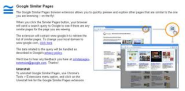
    Google Similar Pages

    Shows four similar pages to the one you are on now. An absolutely essential app for bloggers or just those looking for more of the same!

    Comments [0]
  9. Google Similar Pages

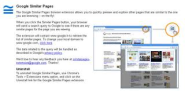
    Google Similar Pages

    Discover similar pages to the one you are looking at.

    Comments [0]
  10. FastestChrome - Browse Faster

    FastestChrome - Browse Faster

    Usually nice feature that pre-fetches your next page for you.

    Comments [0]
  11. Lastpass

    This was the extension I was waiting for before completely switching away from Firefox!

    Comments [0]
  12. google mail checker plus

    i think this is a best way for checking gmail...

    Comments [0]
  13. Google Voice

    Make calls, send SMS, preview Inbox, and get notified of new messages.

    Comments [0]
  14. AutoPager Chrome

    AutoPagerize for Chrome

    Comments [0]
  15. Twitter Search Results on Google

    Adds Twitter search results to Google pages, at top.

    Comments [1]
  16. Tabjump

    Easily see all tabs you have open plus related tabs and tabs you have recently closed. I love being able to quickly get back to a web page I have recently closed.

    Comments [0]
  17. ThoughtChirps

    Cool twitter extension with good shortened url

    Comments [0]
  18. Friends Mural for Facebook

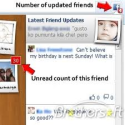
    Beautiful browser chrome notifications when selected friends update their Facebook profiles.

    Comments [0]
  19. FlashVideoDownload

    Banned from the official Chrome Extension repository, but the closest I've found to replace Firefox's VideoDownloadHelper

    Comments [0]
  20. Readability

    Readability is a simple tool that makes reading on the Web more enjoyable by removing the cluter around what you're reading


    Comments [0]

Awaiting Moderation

  1. Klout

    Adds Klout to your Twitter.com timeline.

    Comments [0]
  2. Picnik Extension for Chrome

    The Picnik Extension for Chrome lets you easily edit the images you come across while browsing the web.

    Comments [0]
  3. Embedly

    The Embedly extension creates a rich experience while browsing Twitter. - a total time saver must have for twitter.com users.

    Comments [0]
  4. Proxlet Tweet Filter - Chrome Web Store

    Fight the noise on Twitter. Mute users, filter tags, and block apps (permanently or temporarily). - a brilliant tool.

    Comments [0]
  5. Klip Me

    klip Me is a Browser extension for Kindle owners who prefer reading web content on their devices. - [it's a boon.]

    Comments [0]
  6. Google Search Sidebar

    Add a sidebar next to any Google search with results from Wiktionary (dictionary), Wikipedia, Flickr and YouTube.

    Comments [0]
  7. Turn Off the Lights

    The entire page will be fading to dark, so you can watch the video as if you were in the cinema.

    Comments [0]